Wageningen University & Research | FEM-31806 | Models for Ecological Systems | FEM | PPS | WEC
GPLakeR - Day 3
Aims
Time step convergence
Compare different methods of integration for different time steps. Note that you can simply set these as arguments for your model calling function
ode. Compare the Euler method with a variable time-step 4th order Runga-Kutta method (“ode45”). Run the model with Euler for a time step of 1, 5 and 10 days. Save the output with computed states for these runs with Euler and save also one output for a run with ode45 as method. For a direct comparison with output at exactly the same moments in time for both integration methods, you can define the variabledeltand adjust the sequence that you use to define the output for time (e.g.:seq(0, 1000, by=delt)). Note that the actual time-steps taken by when using the ode45 integration method will be smaller as the time step is in this method adjusted when required.Plot the state variables of the 4 simulations against time in the same plot. Alternatively, plot the state variables of each of the three Euler simulations with those computed with the ode45 integration method in a plot. Limit the plotting ranges for the x- and y by setting
xlim = c(... , ...)andylim = c(... , ...)to zoom in to times when the model outputs quickly change. What can you roughly conclude for the appropriate time step using Euler?You can also calculate the relative deviation of Euler when compared to the ode45 results (by computing |Euler state-RK state|/RK state , for example at time = 2000 days). Within what range of time-step values do state variables not differ more than 1% after a reasonable time period (2000 days)?
Develop an equation to calculate the time coefficients for each of the state variables. Implement them and plot time coefficients against time.
Mass balances tests
- Choose the appropriate mass variables in your model, either C, P or N if present.
- Define the sum of all the mass inflows and all the sum of all mass outflows for each of your mass variables in the model.
- Define the balance for each of the mass variables in the model.
- Create a plot to check the mass balance visually: in other words, check the dynamics in each of the mass variables over time. What is your expectation? Is your expectation supported by the graphical output?
Answers
Download here the code as shown on this page in a separate .r file.
Compare integration methods
To check for the difference between Euler and Runge-Kutta
integration, let’s solve the model numerically for 2000 time-units in
time-steps of 1, 5 and 10 (the fixed time-step of the euler
method), as well as with a variable time-step Runge-Kutta method
(ode45, here with output every time-step):
states_rk <- ode(y = InitGPLakeR(sPmacr = 250,
                                sPphyt = 0,
                                sPwater = 0),
                 times = seq(from = 0, to = 2000, by = 1),
                 parms = ParmsGPLakeR(),
                 func = RatesGPLakeR,
                 method = "ode45")

delt <- 1
states_euler1 <- ode(y = InitGPLakeR(sPmacr = 250,
                                sPphyt = 0,
                                sPwater = 0),
                 times = seq(from = 0, to = 2000, by = delt),
                 parms = ParmsGPLakeR(),
                 func = RatesGPLakeR,
                 method = "euler")

delt <- 5
states_euler2 <- ode(y = InitGPLakeR(sPmacr = 250,
                                sPphyt = 0,
                                sPwater = 0),
                 times = seq(from = 0, to = 2000, by = delt),
                 parms = ParmsGPLakeR(),
                 func = RatesGPLakeR,
                 method = "euler")

delt <- 10
states_euler3 <- ode(y = InitGPLakeR(sPmacr = 250,
                                sPphyt = 0,
                                sPwater = 0),
                 times = seq(from = 0, to = 2000, by = delt),
                 parms = ParmsGPLakeR(),
                 func = RatesGPLakeR,
                 method = "euler")
We can have a look at the output of the last time-steps (for all 4 solutions):
tail(states_rk)## time sPmacr sPphyt sPwater dPmacr dPphyt dPwater
## [1996,] 1995 244.9865 48.52819 2.475831 -2.169418e-05 2.335407e-06 -2.428463e-06
## [1997,] 1996 244.9864 48.52819 2.475829 -2.161492e-05 2.326873e-06 -2.419587e-06
## [1998,] 1997 244.9864 48.52819 2.475827 -2.153595e-05 2.318370e-06 -2.410743e-06
## [1999,] 1998 244.9864 48.52819 2.475824 -2.145727e-05 2.309899e-06 -2.401932e-06
## [2000,] 1999 244.9864 48.52820 2.475822 -2.137888e-05 2.301458e-06 -2.393153e-06
## [2001,] 2000 244.9864 48.52820 2.475819 -2.130078e-05 2.293049e-06 -2.384406e-06tail(states_euler1)## time sPmacr sPphyt sPwater dPmacr dPphyt dPwater
## [1996,] 1995 244.9859 48.52825 2.475770 -1.967020e-05 2.117487e-06 -2.201801e-06
## [1997,] 1996 244.9859 48.52825 2.475767 -1.959821e-05 2.109735e-06 -2.193738e-06
## [1998,] 1997 244.9859 48.52825 2.475765 -1.952648e-05 2.102012e-06 -2.185706e-06
## [1999,] 1998 244.9858 48.52825 2.475763 -1.945501e-05 2.094317e-06 -2.177703e-06
## [2000,] 1999 244.9858 48.52826 2.475761 -1.938380e-05 2.086651e-06 -2.169729e-06
## [2001,] 2000 244.9858 48.52826 2.475759 -1.931286e-05 2.079012e-06 -2.161784e-06tail(states_euler2)## time sPmacr sPphyt sPwater dPmacr dPphyt dPwater
## [396,] 1975 244.9839 48.52846 2.475543 -1.226647e-05 1.320395e-06 -1.372837e-06
## [397,] 1980 244.9838 48.52847 2.475536 -1.204199e-05 1.296229e-06 -1.347708e-06
## [398,] 1985 244.9838 48.52848 2.475530 -1.182161e-05 1.272505e-06 -1.323038e-06
## [399,] 1990 244.9837 48.52848 2.475523 -1.160527e-05 1.249216e-06 -1.298820e-06
## [400,] 1995 244.9836 48.52849 2.475516 -1.139289e-05 1.226352e-06 -1.275046e-06
## [401,] 2000 244.9836 48.52850 2.475510 -1.118440e-05 1.203908e-06 -1.251706e-06tail(states_euler3)## time sPmacr sPphyt sPwater dPmacr dPphyt dPwater
## [196,] 1950 244.9811 48.52876 2.475237 -2.241715e-06 2.412833e-07 -2.508351e-07
## [197,] 1960 244.9811 48.52876 2.475234 -2.159667e-06 2.324521e-07 -2.416540e-07
## [198,] 1970 244.9811 48.52876 2.475232 -2.080622e-06 2.239441e-07 -2.328090e-07
## [199,] 1980 244.9811 48.52877 2.475229 -2.004470e-06 2.157475e-07 -2.242877e-07
## [200,] 1990 244.9811 48.52877 2.475227 -1.931106e-06 2.078509e-07 -2.160783e-07
## [201,] 2000 244.9810 48.52877 2.475225 -1.860426e-06 2.002433e-07 -2.081694e-07Now, you can plot all solutions together in a single figure using:
plot(states_rk, states_euler1,states_euler2, states_euler3)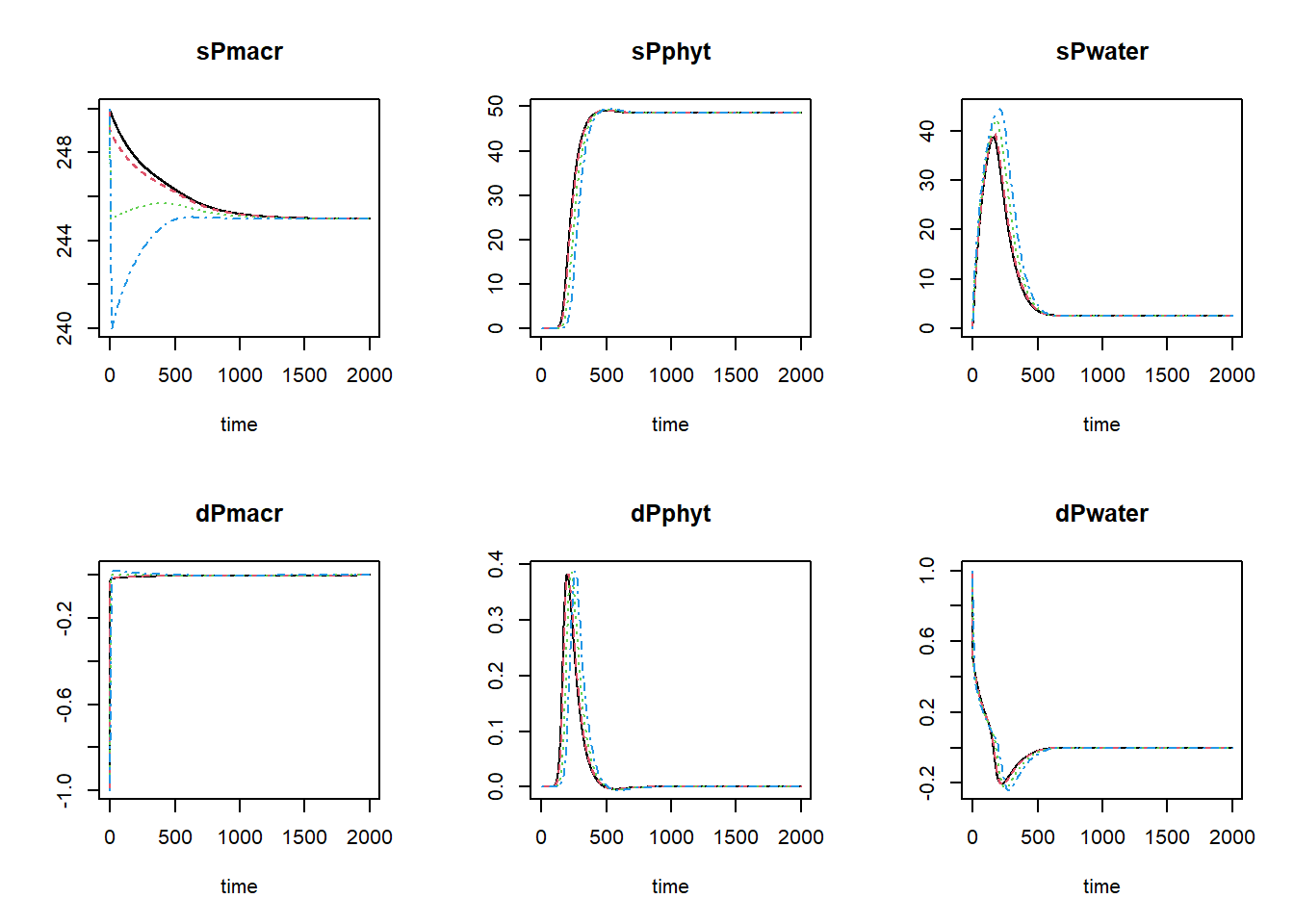
The black line now is the Runge-Kutta solution (with variable
time-step), the dashed red line is the first Euler solution (with
time-step of 1), the dashed green line is the second Euler solution
(with time-step of 5), and the dashed blue line is the third Euler
solution (with time-step of 10). To focus a bit more on the first time
steps, we can limit the x-axis to a range between 0 and 400 using the
xlim argument:
plot(states_rk, states_euler1,states_euler2, states_euler3, xlim=c(0,400))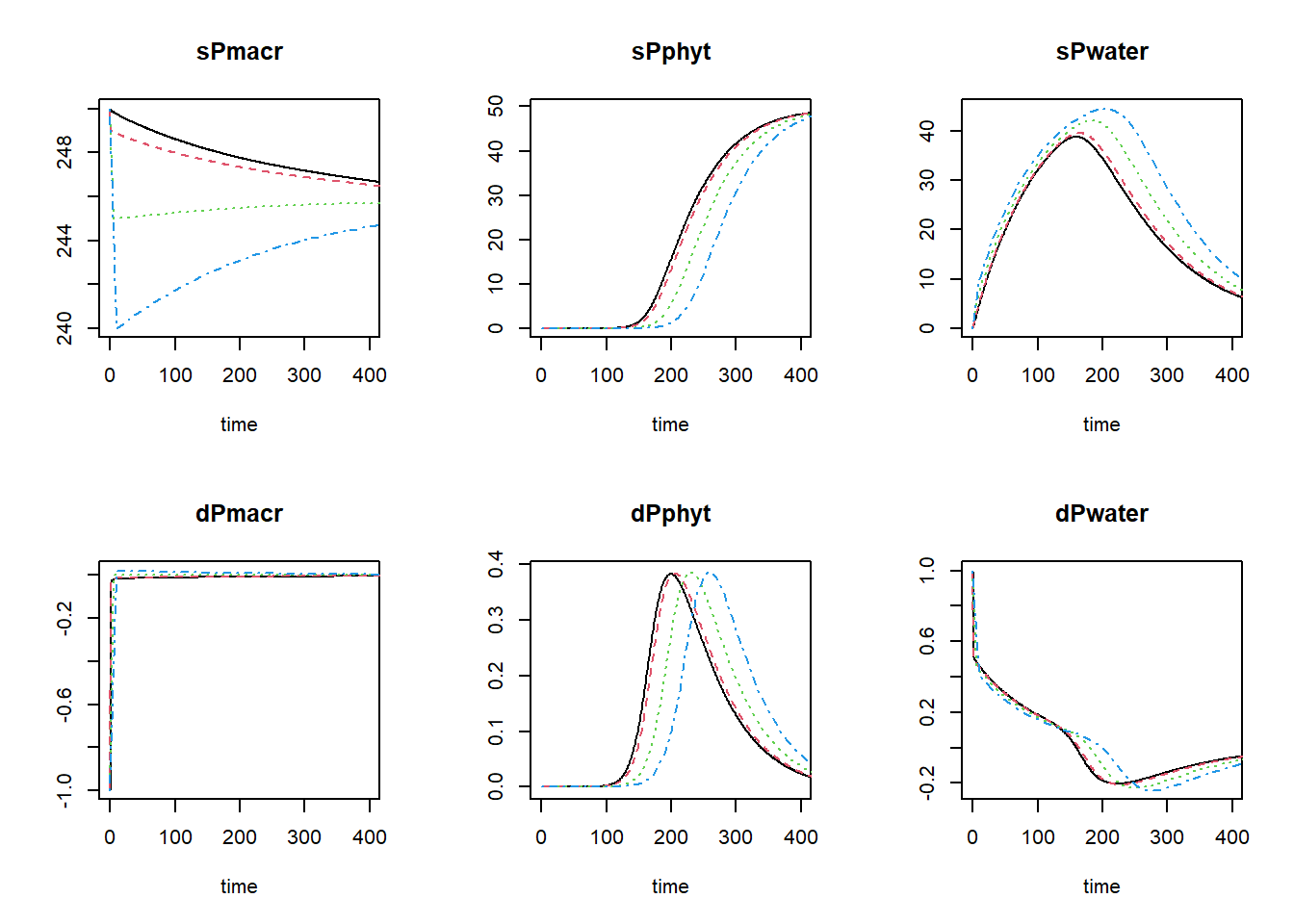
We see that for sPmacr, sPphyt and sPwater the solution with Euler integration at a larger time-step is quite some difference from the Runge-Kutta solution or the Euler solution with a small time-step!
To get the relative difference between the integration methods at time 2000 (here as a fraction of the reference ode45, rounded off to 4 digits):
round(100 * tail(states_euler1, 1)[,-1] / tail(states_rk,1)[,-1], 4)## sPmacr sPphyt sPwater dPmacr dPphyt dPwater
## 99.9998 100.0001 99.9975 90.6674 90.6659 90.6634round(100 * tail(states_euler2, 1)[,-1] / tail(states_rk,1)[,-1], 4)## sPmacr sPphyt sPwater dPmacr dPphyt dPwater
## 99.9989 100.0006 99.9875 52.5070 52.5025 52.4955round(100 * tail(states_euler3, 1)[,-1] / tail(states_rk,1)[,-1], 4)## sPmacr sPphyt sPwater dPmacr dPphyt dPwater
## 99.9978 100.0012 99.9760 8.7341 8.7326 8.7305and here as a relative difference:
round(100 * abs ( (tail(states_euler1, 1)[,-1] - tail(states_rk,1)[,-1]) / tail(states_rk,1)[,-1] ), 4)## sPmacr sPphyt sPwater dPmacr dPphyt dPwater
## 0.0002 0.0001 0.0025 9.3326 9.3341 9.3366round(100 * abs ( (tail(states_euler2, 1)[,-1] - tail(states_rk,1)[,-1]) / tail(states_rk,1)[,-1] ), 4)## sPmacr sPphyt sPwater dPmacr dPphyt dPwater
## 0.0011 0.0006 0.0125 47.4930 47.4975 47.5045round(100 * abs ( (tail(states_euler3, 1)[,-1] - tail(states_rk,1)[,-1]) / tail(states_rk,1)[,-1] ), 4)## sPmacr sPphyt sPwater dPmacr dPphyt dPwater
## 0.0022 0.0012 0.0240 91.2659 91.2674 91.2695These values indicate that after long time (2000 time units), there is not much difference between the integration methods and time-steps, as the system has approached the equilibrium. However, as can be seen in the figures above the Euler integration method with smaller time-step better approaches the variable time-step Runge-Kutta method. Using the Euler integration method, when the time-step increases, the deviation from the Runge-Kutta solution increases. Thus, this pattern demonstrates the expected pattern of time-step convergence.
Therefore, if we compute the relative difference between the Euler solutions and the Runge-Kutta solution at time 400, the solution with a time-step of 1 still is within 1% of the Runge-Kutta solution (for sPmacr and sPphyt), but the other time steps are close to or above 1%:
doTime <- 400
round(100 * abs(subset(states_euler1, time == doTime) - subset(states_rk, time == doTime)) /
        subset(states_rk, time == doTime), 4)
## sPmacr sPphyt sPwater dPmacr dPphyt dPwater
## 0.0781 0.1426 4.9974 -19.6293 9.6375 -7.1269round(100 * abs(subset(states_euler2, time == doTime) - subset(states_rk, time == doTime)) /
subset(states_rk, time == doTime), 4)## sPmacr sPphyt sPwater dPmacr dPphyt dPwater
## 0.4163 0.9759 27.6739 -103.3690 55.9459 -38.3758round(100 * abs(subset(states_euler3, time == doTime) - subset(states_rk, time == doTime)) /
subset(states_rk, time == doTime), 4)## sPmacr sPphyt sPwater dPmacr dPphyt dPwater
## 0.8484 2.8542 63.4037 -208.8010 137.4064 -84.5211To get the information needed to compute the time coefficients (the
value of the state variables when the system is in equilibrium, but also
the rates of change of the state variables over time), we have to change
AUX <- NULL in function RatesGPLakeR to
AUX <- RATES.
##      time   sPmacr       sPphyt   sPwater      dPmacr       dPphyt   dPwater
## [1,]    0 250.0000 0.000000e+00  0.000000 -0.99999900 1.000000e-06 1.0000000
## [2,]   20 249.5898 4.809886e-05  9.254709 -0.01479456 4.796474e-06 0.4156687
## [3,]   40 249.3107 2.834216e-04 16.786909 -0.01324499 2.350526e-05 0.3401185
## [4,]   60 249.0574 1.438182e-03 22.951159 -0.01211421 1.154142e-04 0.2783596
## [5,]   80 248.8251 7.113070e-03 27.994746 -0.01114380 5.671125e-04 0.2276206
## [6,]  100 248.6110 3.495244e-02 32.110979 -0.01027607 2.776681e-03 0.1850694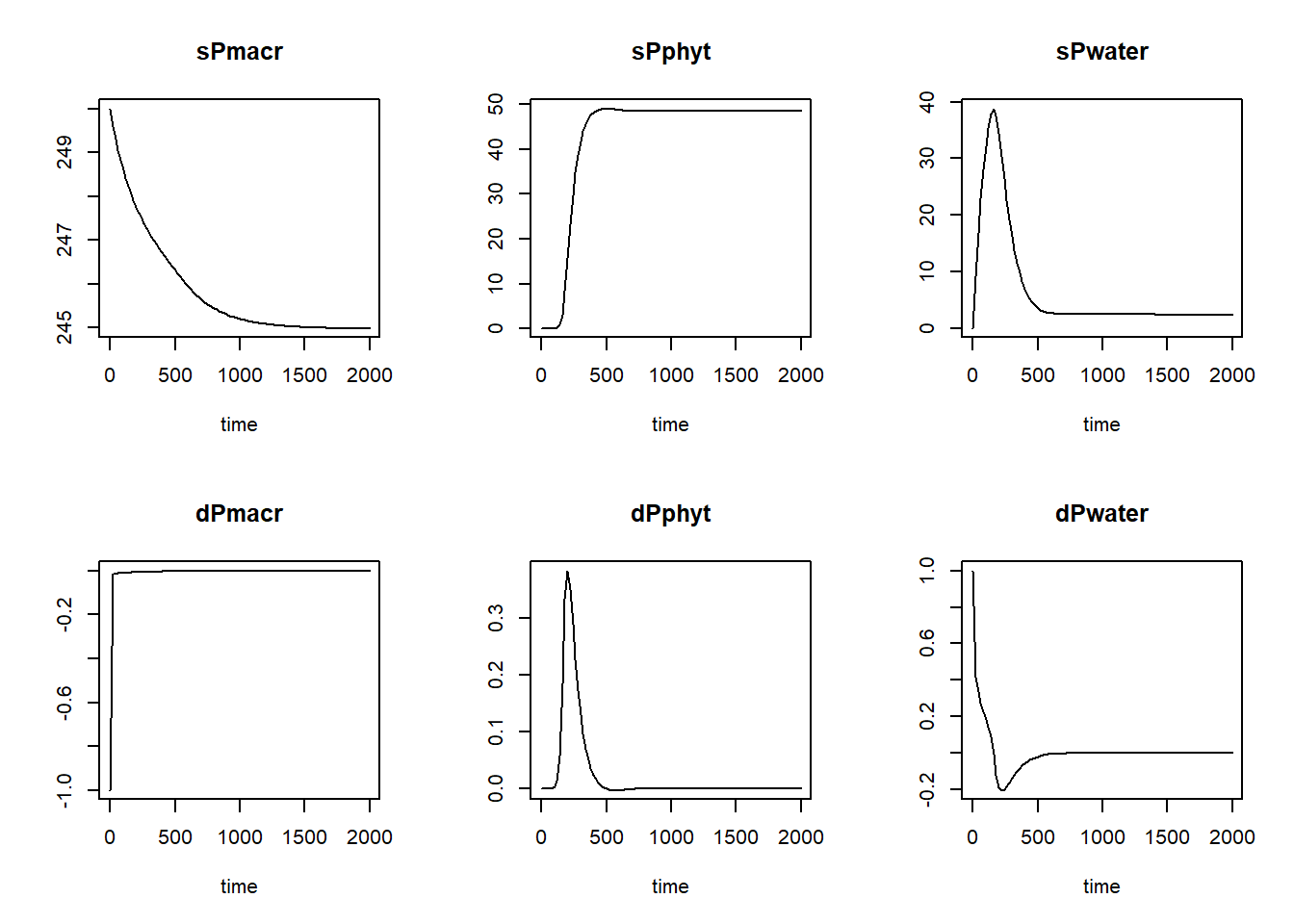
Then, we can define a function that computes the time coefficient; it needs as input a solved model, as well as the time at which the system has reached equilibrium. With this information, we can compute the time coefficients:
tcGPLakeR <- function(states, time_equil) {
  # Find index for row with states that are in equilibrium
  ii <- which(states[,"time"] == time_equil)

  # Compute TC for all states using general TC formula
  TC <- data.frame(time = states[,"time"],
                   TC_sPmacr = abs( (states[,"sPmacr"] - states[ii,"sPmacr"]) / states[,"dPmacr"] ),
                   TC_sPphyt = abs( (states[,"sPphyt"] - states[ii,"sPphyt"]) / states[,"dPphyt"] ),
                   TC_sPwater = abs( (states[,"sPwater"] - states[ii,"sPwater"]) / states[,"dPwater"] ))
  return(TC)
}
With a solved model, we can now thus compute the time coefficients, and plot how they vary over time:
states_rk <- ode(y = InitGPLakeR(sPmacr = 250,
                                sPphyt = 0,
                                sPwater = 0),
                 times = seq(from = 1, to = 2000, by = 1),
                 parms = ParmsGPLakeR(),
                 func = RatesGPLakeR,
                 method = "ode45")
TC <- tcGPLakeR(states=states_rk, time_equil = 2000)
par(mfrow = c(2,3)) # reset using par(mfrow = c(1,1)) after plotting the plots
plot(states_rk[,"time"], states_rk[,"sPmacr"], ylab="sPmacr", xlab="time", type="l", col = "black")
plot(states_rk[,"time"], states_rk[,"sPphyt"], ylab="sPphyt", xlab="time", type="l", col = "black")
plot(states_rk[,"time"], states_rk[,"sPwater"], ylab="sPwater", xlab="time", type="l", col = "black")
plot(TC[,"time"], TC[,"TC_sPmacr"], ylab="TC sPmacr", xlab="time", type="l", col = "black")
plot(TC[,"time"], TC[,"TC_sPphyt"], ylab="TC sPphyt", xlab="time", type="l", col = "black")
plot(TC[,"time"], TC[,"TC_sPwater"], ylab="TC sPwater", xlab="time", type="l", col = "black")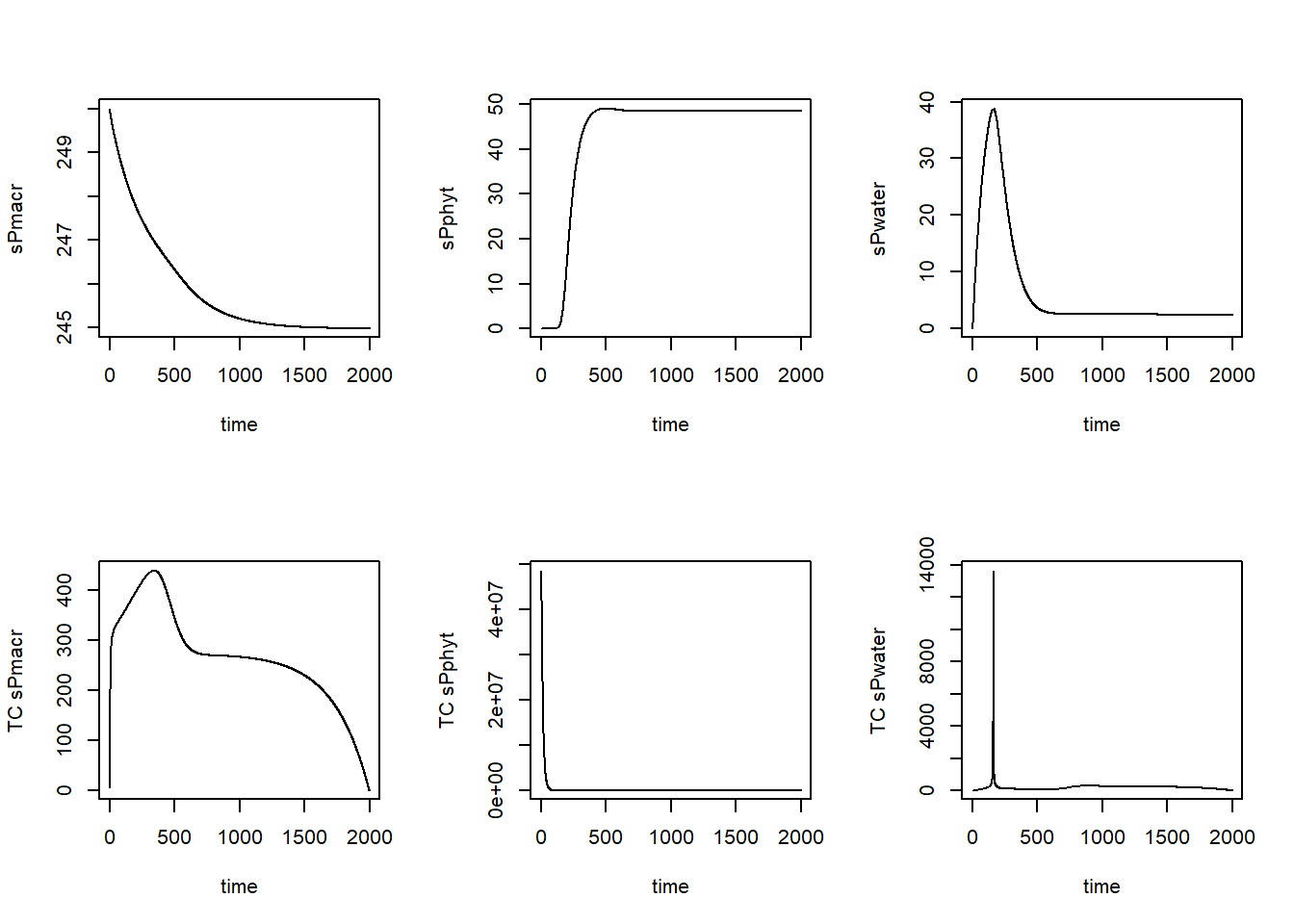
As we can see, the time coefficients vary quite a bit over time. We may be interested in the minimum time coefficient during times where the system is not yet in equilibrium. Let’s say from the plots that this is up to time 800. We can thus compute the minimum time coefficient up to that time:
TC_sub = subset(TC, time <= 800)
min(TC_sub$TC_sPmacr)
## [1] 5.013633min(TC_sub$TC_sPphyt)## [1] 0.03182582min(TC_sub$TC_sPwater)## [1] 0.09464382Thus, the minimum time coefficient seems to be ca. 0.032.
Mass balances tests
To analyse the mass balance of the model, let’s copy-paste the “InitGPLakeR” and “RatesGPLakeR” functions as defined earlier, and add 6 extra states (in and out per state variable sPmacr, sPphyt, and sPwater), at initial value 0:
InitGPLakeR <- function(sPmacr = 250, # Areal P content of macrophytes (mg P.m-2)
                        sPphyt = 0, # Areal P content of phytoplankton (mg P.m-2)
                        sPwater = 0 # (Free) P concentration in the water (mg P.m-3)
                       ) {
  # Gather initial conditions in a named vector; given names are names for the state variables in the model
  y <- c(sPmacr = sPmacr,
         sPphyt = sPphyt,
         sPwater = sPwater,
         sPmacrIN = 0, sPmacrOUT = 0, # to keep track of mass balance terms
         sPphytIN = 0, sPphytOUT = 0,
         sPwaterIN = 0, sPwaterOUT = 0)

  # Return
  return(y)
}
In the function computing the rates of change of the state variables with respect to time, we now have to include the rates of change for these 6 new variables as well:
RatesGPLakeR <- function(t, y, parms) {
  # use the with() function to be able to access the parameters and states easily
  # remember that the with() function is with(data, expr), where
  # - 'data' is ideally a list with named elements
  #   thus: 'y' and 'parms' are combined using function c and converted using function as.list
  # - 'expr' is an expression (i.e. code) that is evaluated
  #   this can span multiple lines of code when embraced with curly brackets {}
  with(
    as.list(c(y, parms)),{

      ### Optional: forcing functions: get value of the driving variables at time t (if any)

      ### Optional: auxiliary equations
      Pwater <- max(sPwater, 0)
      LRmacr <- Mmacr * ( 1 - log(exp(nIntlog * (1 - Pload / (Rmacr * Mmacr))) + 1) / log(exp(nIntlog) + 1))
      LRphyt <- Mphyt * (1 - log(exp(nIntlog * (1 - Pload / ((Rphyt + D) * Mphyt))) + 1) / log(exp(nIntlog) + 1))
      State <- Pcrit ^ nHill / (Pcrit ^ nHill + sPphyt ^ nHill)
      Pmacreq <- LRmacr * State
      Pphyteq <- min(max(((Pload - Rmacr * sPmacr) / (Rphyt + D)),0),LRphyt) * State + LRphyt * (1 - State)
      Pwatereq <-  ((Pload - (Rphyt + D) * LRphyt) / (z * D)) * (1 - State)
      Macrnutrlim <- Pwater / (Hmacrnutr + Pwater)
      Phytnutrlim <- Pwater / (Hphytnutr + Pwater)
      Hmacrdens <- Rmacr / (Gmacr - Rmacr) # H for density dependence of macrophytes
      Hphytdens <- (Rphyt + D) / (Gphyt - (Rphyt + D)) # H for density dependence of phytoplankton
      Macrdenslim <- Hmacrdens / (Hmacrdens + sPmacr / (Pmacreq + inocmacr))
      Phytdenslim <- Hphytdens / (Hphytdens + sPphyt / (Pphyteq + inocphyt))
      GRmacr <- Gmacr * Macrnutrlim * Macrdenslim
      GRphyt <- Gphyt * Phytnutrlim * Phytdenslim

      ### Rate equations
      dPmacr <- inocratemacr + GRmacr * sPmacr - Rmacr * sPmacr
      dPphyt <- inocratephyt + GRphyt * sPphyt - (Rphyt + D) * sPphyt
      dPwater <- (Pload - GRmacr * sPmacr - GRphyt * sPphyt) / z - D * Pwater

      ### Gather all rates of change in a vector
      # - the rates should be in the same order as the states (as specified in 'y')
      # - it can be a named vector, but does not need to be
      RATES <- c(dPmacr = dPmacr,
                 dPphyt = dPphyt,
                 dPwater = dPwater)

      ### Optional: get in/out flow used to compute mass balances (or set MB <- NULL)
      dsPmacrINdt = inocratemacr + GRmacr * sPmacr
      dsPmacrOUTdt = Rmacr * sPmacr
      dsPphytINdt = inocratephyt + GRphyt * sPphyt
      dsPphytOUTdt = (Rphyt + D) * sPphyt
      dsPwaterINdt = Pload / z  # in mg P.m-3.d-1
      dsPwaterOUTdt = (GRmacr * sPmacr + GRphyt * sPphyt) / z + D * Pwater # in mg P.m-3.d-1

      # Gather in a named vector
      MB <- c(dsPmacrINdt = dsPmacrINdt, dsPmacrOUTdt = dsPmacrOUTdt,
              dsPphytINdt = dsPphytINdt, dsPphytOUTdt = dsPphytOUTdt,
              dsPwaterINdt = dsPwaterINdt, dsPwaterOUTdt = dsPwaterOUTdt)

      ### Optional: gather auxiliary variables that should be returned (or set AUX <- NULL)
      # - this should be a named vector or list!
      AUX <- NULL

      # Return result as a list
      # - the first element is a vector with the rates of change (in the same order as 'y')
      # - all other elements are (optional) extra output, which should be named
      outList <- list(c(RATES, # the rates of change of the state variables (same order as 'y'!)
                        MB),   # the rates of change of the mass balance terms (or NULL)
                      AUX) # optional additional output per time step
      return(outList)
    })
}
Now, we can solve the model with these extra states using:
states <- ode(y = InitGPLakeR(sPmacr = 250,
                              sPphyt = 0,
                              sPwater = 0),
              times = seq(1, 2000, by = 1),
              parms = ParmsGPLakeR(),
              func = RatesGPLakeR,
              method = "ode45")
and plot the result:
plot(states)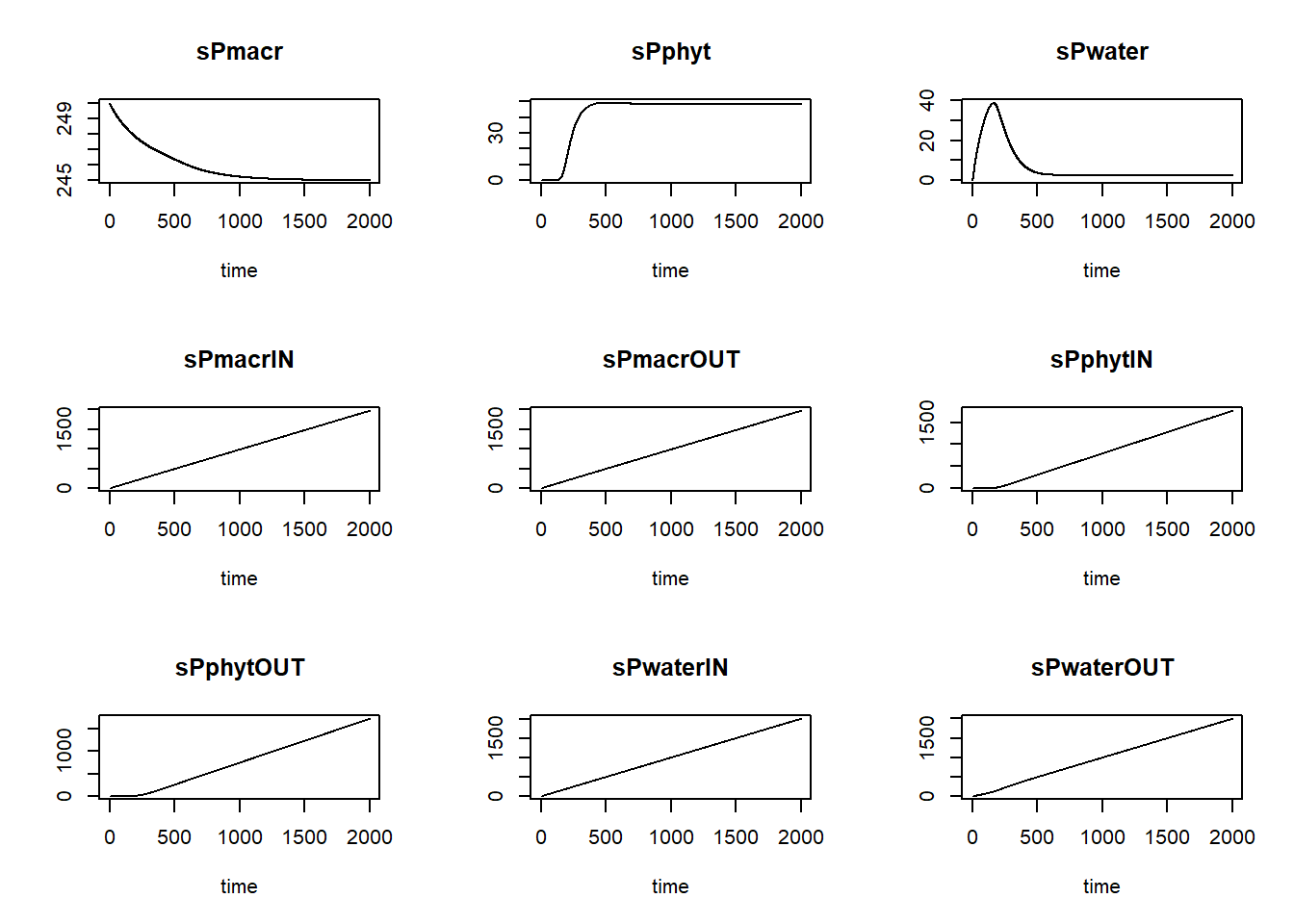
We can now define a function computing the mass balances, one that
needs 2 inputs: state and init, which
respectively are an object as returned by the ode function,
and a vector with initial conditions for the state variables:
MassBalanceGPLakeR <- function(y, ini) {

  # Add "0" to the state variables' names to indicate initial condition
  names(ini) = paste0(names(ini), "0")

  # Using the with() function we can access elements directly by their name
  # here: 'y' is a deSolve matrix
  # so it is best to first convert it to a data.frame using function as.data.frame()
  # and then combine it with 'ini' using the function c()
  # and convert to a list using as.list()
  with(as.list(c(as.data.frame(y), ini)), {

    # Compute mass balance terms
    BAL = data.frame(time = time,
                     sPwaterbal = sPwater + sPwaterOUT - sPwaterIN - sPwater0,
                     sPmacrbal = sPmacr + sPmacrOUT - sPmacrIN - sPmacr0,
                     sPphytbal = sPphyt + sPphytOUT - sPphytIN - sPphyt0)

    # Return output BAL
    return(BAL)
  })
}
After defining this function, we can check the mass balances per state variable and plot them:
balance = MassBalanceGPLakeR(states, ini = InitGPLakeR())
par(mfrow = c(2,2))
plot(balance[,"time"], balance[,"sPwaterbal"], type="l", xlab="time", ylab="Balance sPwater")
plot(balance[,"time"], balance[,"sPmacrbal"], type="l", xlab="time", ylab="Balance sPmacr")
plot(balance[,"time"], balance[,"sPphytbal"], type="l", xlab="time", ylab="Balance sPphyt")
par(mfrow = c(1,1))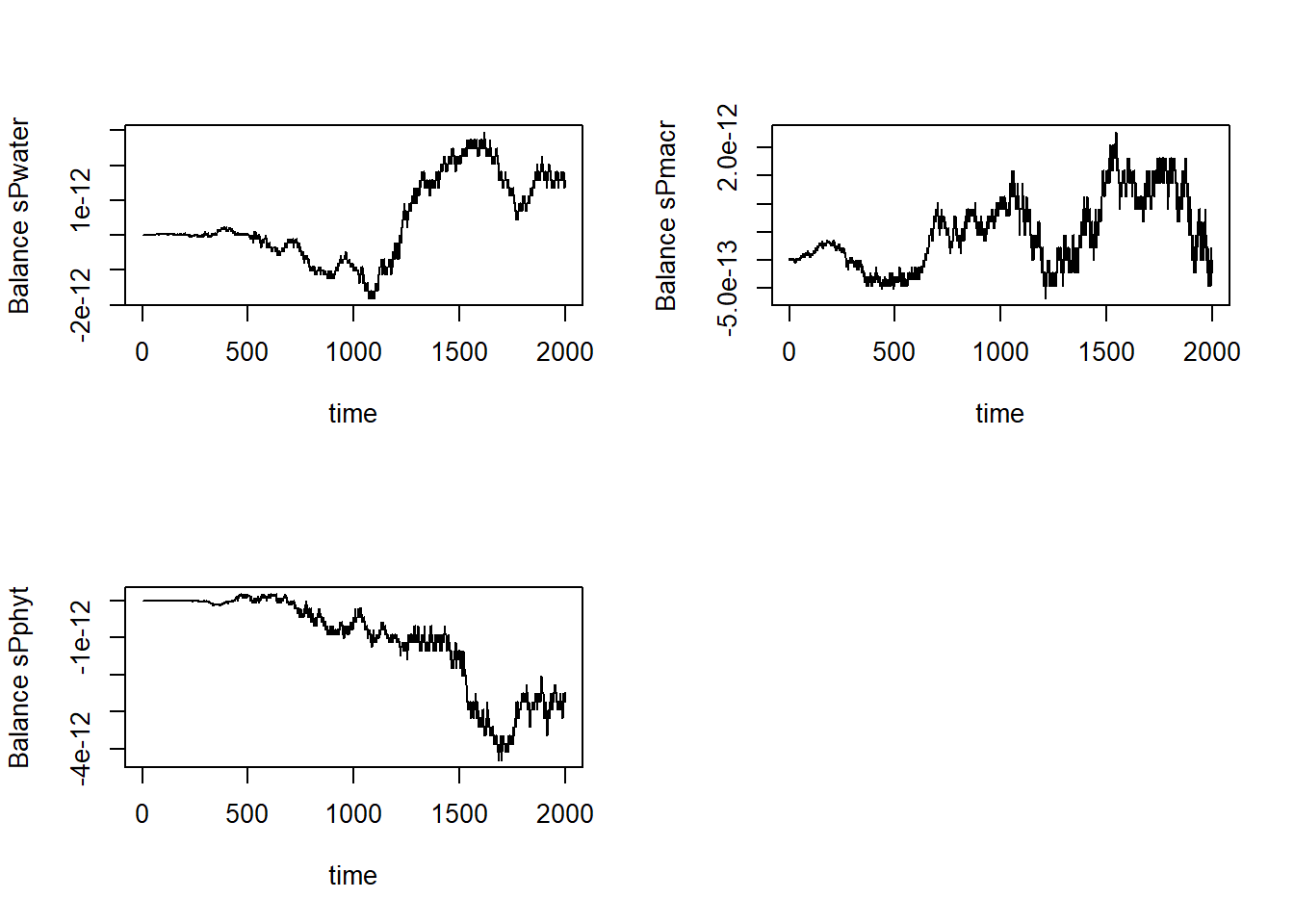
Note that the balances are sufficiently small
(e.g. 1e-12) to consider it effectively zero!